 HiFiRated
MOTU M2 Review — An underdog hardware manufacturer disrupts the entry-level market by prioritizing pro-grade specs and raw performance over flashy software bundles
TL;DR
Despite a lackluster software bundle and the omission of a monitor mix knob, the M2's raw hardware performance punches way above its price class. Its ability to cleanly drive gain-hungry mics like the SM7B and its ultra-low latency make it an unbeatable value for serious home stu
Verdict: Buy
What people are saying
Sources disclosed below
Reviewer Verdicts
Avg of 4 video reviews
Sanjay C, Podcastage, Julian Krause…
Reddit Discussion
Across 32 threads in r/homerecording, r/audioengineering, r/audiophile
Sentiment summary, not a rating
Pros
- +Ultra-clean preamps with +60dB gain, easily driving gain-hungry mics like the SM7B
- +Class-leading, incredibly low round-trip latency
- +Full-color LCD screen provides highly usable visual metering
- +Independent phantom power and monitoring buttons for each channel
- +Powerful headphone amp capable of driving high-impedance 250-ohm headphones
- +Built-in loopback functionality for easy streaming and podcasting
Cons
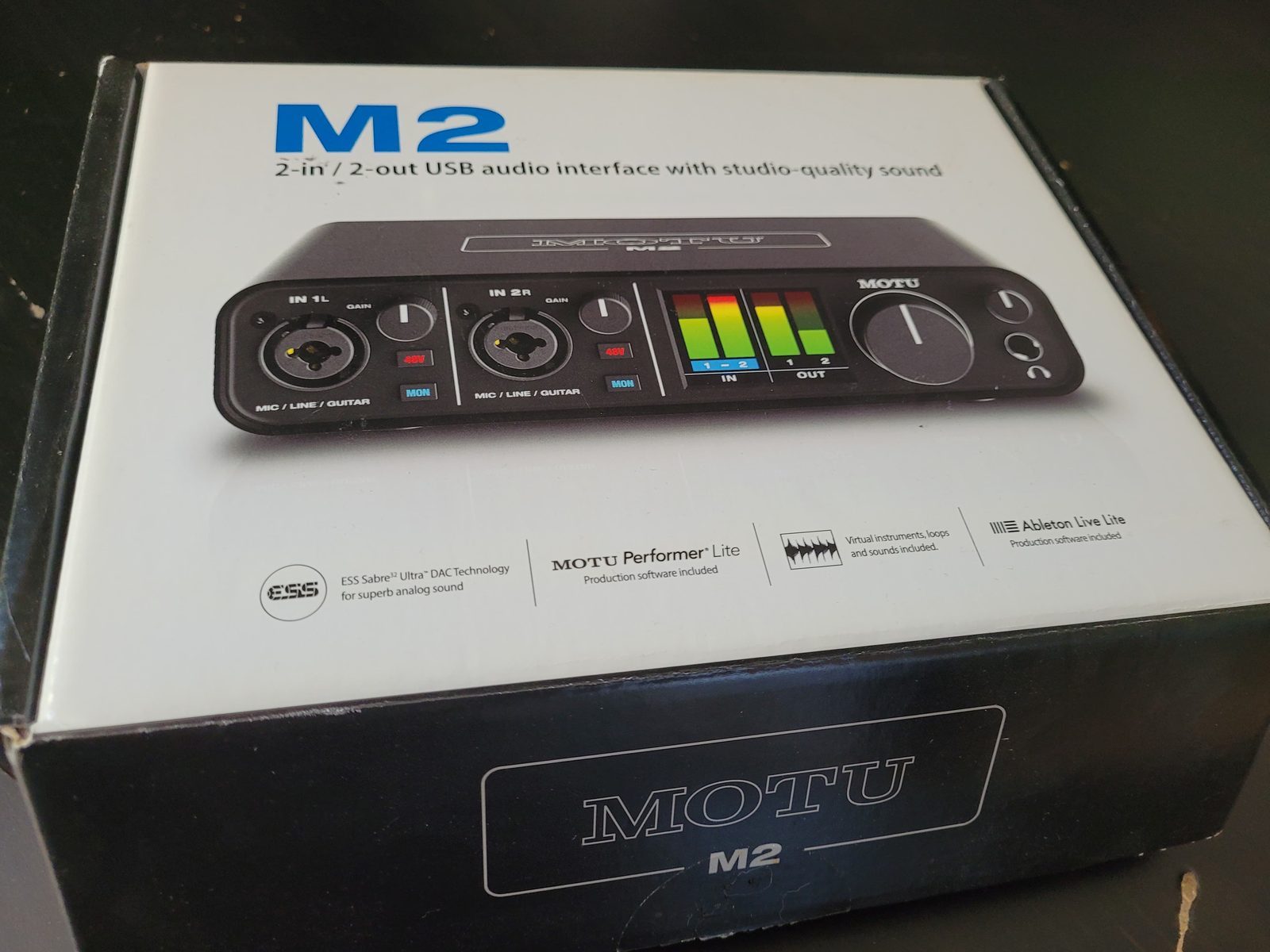
- −Included software bundle is severely lacking compared to competitors
- −Lacks a dedicated physical monitor mix knob to blend DAW and direct signals
- −Strange low-frequency hum occurs if phantom power is left on with dynamic mics
- −Frequently out of stock or difficult to purchase
- −Shorter 2-year warranty compared to competitors offering up to 5 years
Jordan Kim
Published May 2, 2026
$169–$199
Price may vary. Updated regularly.
Forget the Cloudlifter—this sub-$200 interface packs enough clean gain to drive your SM7B without breaking a sweat. If you’ve spent any time in the home studio trenches, you know the drill: buy a budget interface, realize it can’t handle a dynamic microphone, and spend another $150 on a preamp booster. The MOTU M2 effectively kills that cycle.
What you're actually getting
When you unbox the MOTU M2, you aren't paying for a bloated suite of "lite" plugins or a fancy marketing campaign. You’re paying for pure, unadulterated hardware performance. After using this unit for a year, the standout feature remains the full-color LCD screen. It sounds like a gimmick until you’re mid-stream or recording a take and can see your levels with absolute precision without squinting at a tiny LED ring. It’s a level of visual feedback that makes other interfaces in this price bracket feel like they’re stuck in the early 2000s.
The preamps are the real story here. As Julian Krause noted, "You don't need a cloudlifter or fathead with the MOTU M2." I’ve pushed an SM7B through this thing, and it handles the gain requirements with room to spare. The noise floor is impressively low, and the sound is transparent—it doesn't color your signal, which is exactly what you want if you’re planning to do your heavy lifting in the box.
However, it isn't perfect. While the chassis feels like a tank, there is a bit of a divide on the tactile experience. Podcastage pointed out that the knobs and XLR ports have a bit of "wobble" to them. While I haven't had a port fail on me, it’s a reminder that this is still an entry-level price point. You’re getting pro-grade guts in a housing that prioritizes function over high-end industrial design. It’s a tool, not a piece of jewelry.
Performance — what reviewers actually measured
The numbers don't lie, and in this case, they embarrass most of the competition.
| Metric | Value | Context |
|---|---|---|
| Preamp Gain | +60 dB | Enough for SM7B |
| Dynamic Range | 115.5 dBA | Industry-leading |
| Latency | 1.2 ms | Near-zero feel |
| Input Impedance | 3 kOhms | Versatile for mics |
Where it actually wins
The M2 wins because it solves the two biggest headaches for home creators: gain and latency. Most interfaces at this price point struggle to provide enough clean gain for dynamic microphones, forcing you to crank the preamp into the "hiss zone." The M2 stays clean all the way to the top.
Then there’s the latency. If you’re tracking vocals or instruments, even a few milliseconds of delay can throw off your performance. At 1.2 milliseconds, the M2 is essentially real-time. It’s the kind of performance you usually expect from interfaces costing twice as much. The inclusion of loopback functionality is the cherry on top for streamers—it makes routing desktop audio into your recording software or OBS a one-click affair, saving you from the headache of virtual audio cables.
Where it falls short
The biggest frustration is the software bundle. If you’re a total beginner looking for a "studio in a box" experience, you’re going to be disappointed. As Sanjay C put it, "One big disappointment is the MOTU M2's included software package. It's just not up to par." You’re getting the bare minimum, so don't expect a treasure trove of high-end plugins to get you started.
There’s also the lack of a physical monitor mix knob. Most interfaces have a dedicated dial to blend your direct input with your DAW playback. On the M2, you have to manage this through the software or the interface's menu system. It’s a minor workflow friction, but it’s noticeable if you’re used to tactile control. Finally, if you’re a stickler for long-term peace of mind, the 2-year warranty is a bit stingy compared to competitors who offer up to 5 years.
Should you buy it?
Buy if you:
- Use gain-hungry dynamic mics like the Shure SM7B or Electro-Voice RE20.
- Need ultra-low latency for live monitoring or streaming.
- Value accurate, visual metering via the LCD screen over bundled software.
- Want a "set it and forget it" interface that prioritizes audio quality above all else.
Skip if you:
- Are a beginner who needs a massive suite of included plugins to start producing.
- Prefer a physical knob to blend your direct monitor signal.
- Require a longer manufacturer warranty for peace of mind.
The MOTU M2 dominates the sub-$200 category with class-leading latency, pristine preamps, and a genuinely useful LCD screen.
Sources consulted
- Sanjay C — Top budget Audio Interfaces in the world 🔥
- Podcastage — MOTU M2 Audio Interface Review / Test / Explained
- Julian Krause — MOTU M2 USB-C Audio Interface - REVIEW and Measurements!
- Sanjay C — Arturia MiniFuse vs Focusrite Scarlett vs MOTU M2 + Neumann U87
Synthesis combines independent reviews above. Verdicts and quotes attributed to original creators. Affiliate disclosure: we may earn a commission from qualifying purchases via Amazon links.
Products covered in this review
Frequently Asked Questions
Is the MOTU M2 worth buying?
Despite a lackluster software bundle and the omission of a monitor mix knob, the M2's raw hardware performance punches way above its price class. Its ability to cleanly drive gain-hungry mics like the SM7B and its ultra-low latency make it an unbeatable value for serious home studios.
Who is the MOTU M2 best for?
Podcasters, streamers, and home studio musicians who need clean gain for dynamic mics and ultra-low latency.
Who should skip it?
Beginners who rely heavily on bundled software to start their studio, or users who need a physical monitor mix knob.