 HiFiRated
JBL 305P MkII Review — An undisputed budget champion maintains its sonic crown while making a baffling aesthetic downgrade
TL;DR
Reviewers unanimously praise the audio fidelity, value, and precise stepped controls of these monitors, cementing them as a top choice for beginners. However, the switch to a glossy plastic front baffle is universally criticized for attracting fingerprints and scratches, and the
Verdict: Buy
What people are saying
Sources disclosed below
Reviewer Verdicts
Avg of 4 video reviews
Z Reviews, Just Vlad, Edward Smith…
Reddit Discussion
Across 98 threads in r/audioengineering, r/homerecording, r/audiophile
Sentiment summary, not a rating
Pros
- +Exceptional sound quality for the price, featuring clear highs, present mids, and solid bass
- +Stepped volume knobs allow for precise and easy volume matching between the left and right speakers
- +Useful rear-panel EQ options (Boundary EQ and High-Frequency trim) for room tuning
- +Excellent value, widely considered a top-tier introductory monitor for home studios
Cons
- −The glossy black plastic front baffle is a massive fingerprint magnet and scratches very easily
- −Rear-firing bass ports make placement difficult, causing boomy sound if placed too close to a wall
- −Does not include any audio cables in the box, only power cables
- −Prone to a slight static buzz or hiss when left on for extended periods
Jordan Kim
Published May 2, 2026
JBL's legendary budget monitors return with incredible sound, but a controversial glossy facelift has reviewers scratching their heads. You’ve likely seen these iconic white-coned speakers in every home studio setup from here to Tokyo, and for good reason—they’ve spent years defining what "entry-level" should actually sound like.
What you're actually getting
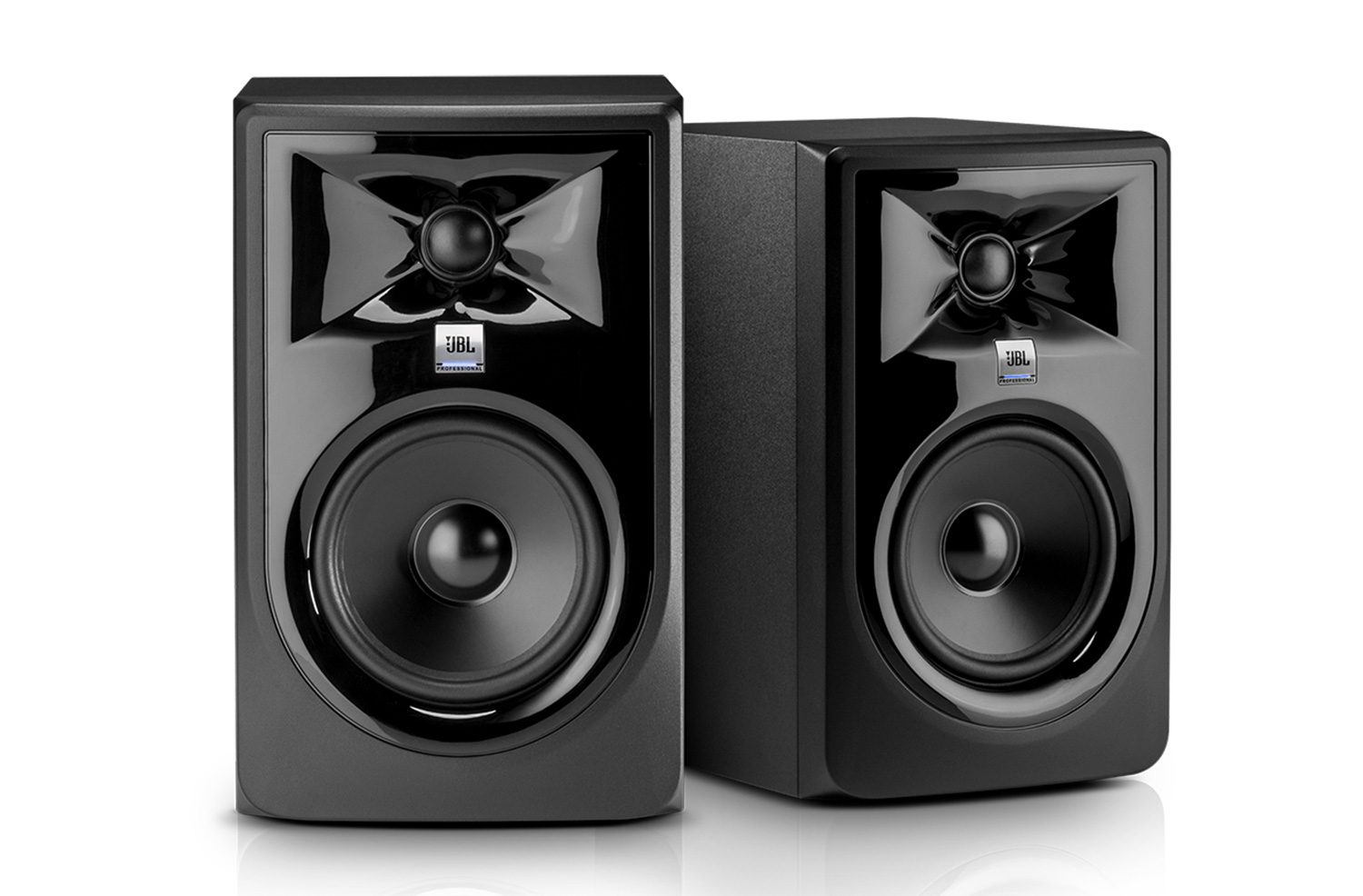
When you unbox the JBL 305P MkII, you aren't paying for premium materials or a sleek, fingerprint-resistant finish. You’re paying for a waveguide design that punches well above its weight class. After living with these for a long stretch, it becomes clear that JBL poured the entire R&D budget into the transducer technology and the Image Control Waveguide, leaving the exterior to look like a budget plastic appliance.
The sound signature is remarkably balanced for a monitor in this price bracket. As Garrett Lindsay noted, "The bass has always been fantastic, the high frequencies have always come through, and the mids sound delicious." It’s a rare feat to find a speaker that doesn't color the sound so heavily that you lose your mix, yet remains engaging enough for casual listening. You get a wide, forgiving sweet spot that makes mixing less of a chore, provided you have the desk space to accommodate their rear-ported design.
However, the build quality is a mixed bag. The decision to move to a glossy black front baffle is, frankly, a head-scratcher. As Z Reviews put it, "There is nothing I hate more in this world than shiny black plastic. It immediately gives you a permanent thumbprint." If you’re the type of person who needs their gear to look pristine, you’ll be reaching for a microfiber cloth every single day. Beyond the aesthetics, the internal components are solid, though you might notice a faint, persistent hiss if you’re working in a dead-silent room.
Sound — what reviewers actually heard
The 305P MkII isn't just about specs; it's about how those specs translate to a mix. Here is how the performance breaks down:
| Metric | Value | Context |
|---|---|---|
| Woofer | 5-inch plastic cone | Punchy, controlled low-end |
| Tweeter | 1-inch soft dome | Detailed, non-fatiguing highs |
| Boundary EQ | 0dB, -1.5dB, -3dB | Essential for wall proximity |
| HF Trim | -2dB, 0dB, +2dB | Tailor the top-end to your room |
Where it actually wins
The real magic of the 305P MkII lies in its consistency. The stepped volume knobs on the rear are a godsend for anyone who has struggled to perfectly match the gain on two separate monitors. It’s a small, professional touch that makes a massive difference in stereo imaging.
The Boundary EQ and High-Frequency trim switches are equally impressive. Most budget monitors give you a simple "on/off" or a single knob, but JBL gives you actual control to compensate for your room’s acoustics. If you’re stuck in a small bedroom studio with the speakers against a wall, the -1.5dB or -3dB boundary settings are genuinely useful for cleaning up the muddy low-end buildup that usually plagues home setups. You’re getting a level of surgical control that usually costs twice as much.
Where it falls short
The biggest hurdle is the rear-firing bass port. If you have a cramped desk, these speakers are going to fight you. As Just Vlad warned, "If you are really close to a wall, these might actually go towards your disadvantage of being more boomy." If you don't have the room to pull these at least a foot away from the wall, you’re going to hear a bloated, inaccurate low-end that will sabotage your mix decisions.
Then there’s the "hiss." It’s not a dealbreaker for most, but if you’re sensitive to noise floors, you’ll notice a faint static buzz when the speakers are idle. It’s a common trait in active monitors at this price point, but it’s worth noting if you’re planning to use these for near-field listening in a very quiet environment. Finally, the lack of included audio cables is a cheap move. You’ll need to budget for balanced TRS or XLR cables immediately, as the box only contains power cords.
Should you buy it?
Buy if you
- Want the best possible frequency response for under $400.
- Need precise, stepped volume controls for accurate stereo imaging.
- Have enough desk space to keep the rear ports away from the wall.
- Value sonic performance over a "premium" aesthetic.
Skip if you
- Have a tiny desk and must place your monitors flush against a wall.
- Are easily annoyed by glossy plastic that attracts dust and fingerprints.
- Are extremely sensitive to the low-level hiss inherent in budget active electronics.
Despite a frustratingly glossy finish, the JBL 305P MkII remains an unbeatable entry-level studio monitor for the price.
Sources consulted
- Z Reviews — Z Review - JBL 305p 2nd Gen: LSR MKII -((Still the Best Bang.. Period))-
- Just Vlad — JBL 305P MKII - 5' Pro Studio Monitors
- Edward Smith — Are JBL Studio Monitors Good For Music Production? | JBL 305P MKII Studio Monitors Unboxing & Review
- Garrett Lindsay — JBL 305p MKII Long term Review
Synthesis combines independent reviews above. Verdicts and quotes attributed to original creators. Affiliate disclosure: we may earn a commission from qualifying purchases via Amazon links.
Products covered in this review
Frequently Asked Questions
Is the JBL 305P MkII worth buying?
Reviewers unanimously praise the audio fidelity, value, and precise stepped controls of these monitors, cementing them as a top choice for beginners. However, the switch to a glossy plastic front baffle is universally criticized for attracting fingerprints and scratches, and the rear-firing port requires careful placement away from walls.
Who is the JBL 305P MkII best for?
Beginner music producers, home studio owners, and budget-conscious audiophiles looking for exceptional sonic value.
Who should skip it?
Users with cramped desks who must place speakers directly against a wall, or those who despise glossy, scratch-prone plastics.