 HiFiRated
Apogee Duet 3 Review — A legendary interface lineage gets a gorgeous modern facelift, but struggles to shake off its historical PC compatibility demons and breakout cable baggage
TL;DR
If you are a Mac or iPad user looking for top-tier preamps and DSP in a travel-friendly format, the Duet 3 sounds fantastic. However, Windows users should be wary of driver stability, and the extra cost of the Dock to avoid the messy breakout cable makes it a pricey proposition.
Verdict: Depends on Use Case
What people are saying
Sources disclosed below
Reviewer Verdicts
Avg of 4 video reviews
Sweetwater, iPad Beat Making, Full Transparency…
Pros
- +Pristine, transparent preamps with excellent clarity and high gain
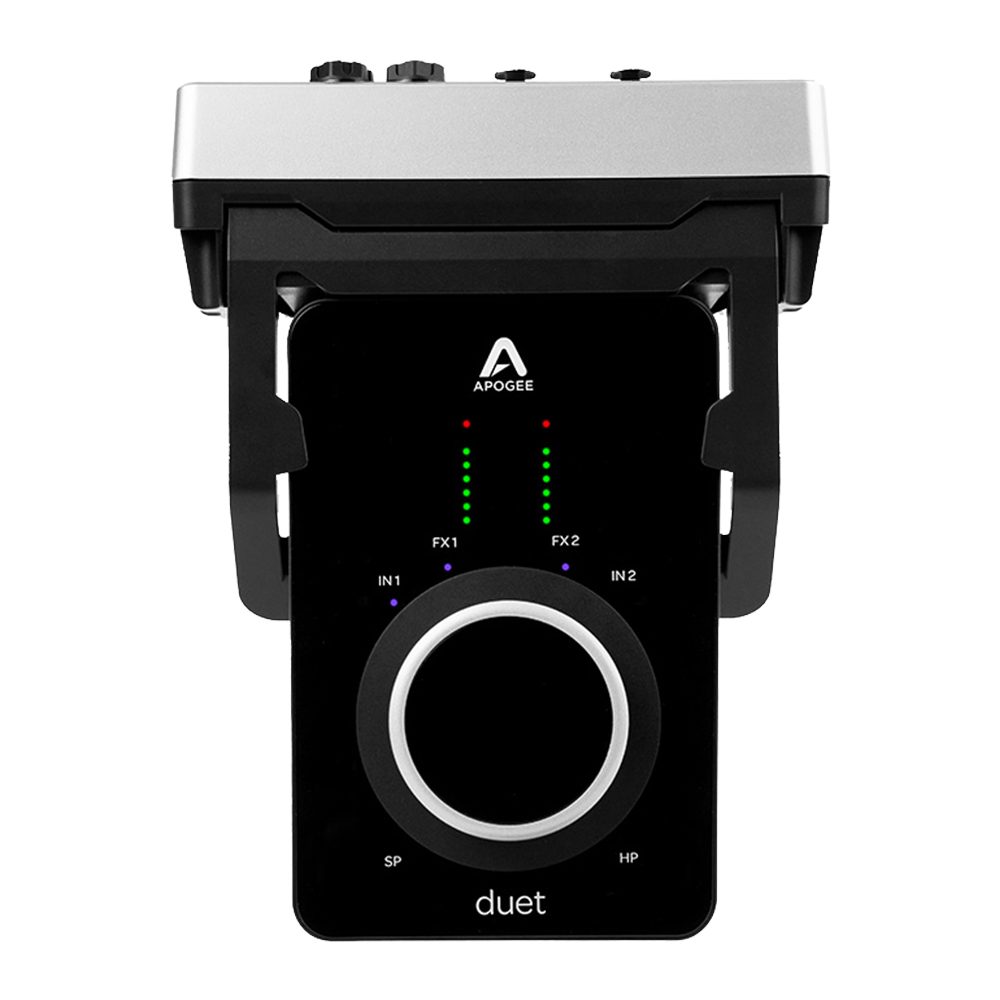
- +Sleek, premium glass design with a satisfying multi-function control knob
- +Highly portable with a fantastic included travel case
- +Built-in DSP for zero-latency tracking using the ECS Channel Strip
- +Fully bus-powered via USB-C, eliminating the need for a wall adapter
Cons
- −The included breakout cable is messy and annoying for desk setups
- −The much-needed desktop Dock accessory costs $150-$180 extra
- −The optional Dock does not fit inside the included travel case
- −Severe software bugs and driver instability, particularly on Windows PCs
- −Second USB-C port is for power only, lacking pass-through charging or hub capabilities
Jordan Kim
Published May 3, 2026
Apogee’s Duet 3 is a masterclass in industrial design that makes every other interface on your desk look like a plastic toy. But beneath that stunning glass top and aluminum chassis lies a device that feels like a love letter to Mac users and a stern "do not enter" sign to everyone else.
What you're actually getting
When you pull the Duet 3 out of the box, you’re immediately struck by the build quality. As Produce Like A Pro rightly noted, "They are works of art, aren't they, Apogee stuff." It’s compact, it’s heavy, and that single multi-function knob is arguably the most satisfying tactile experience you’ll find in the pro audio world. If you’re a mobile producer or a singer-songwriter who needs to capture high-end audio on the go, the included travel case is a thoughtful touch that makes this feel like a premium tool for the road.
However, the reality of living with the Duet 3 is a tale of two worlds. If you’re on a Mac or an iPad, you’re getting some of the cleanest, most transparent preamps in the sub-$1,000 category. The onboard DSP for the ECS Channel Strip is a genuine workflow saver, allowing you to track with compression and EQ without taxing your CPU. It’s a professional-grade signal chain that fits in your jacket pocket.
But then there’s the "other" side of the experience. If you’re a Windows user, you might want to look elsewhere. The driver stability issues are not just minor hiccups; they are fundamental flaws that can turn a creative session into a troubleshooting nightmare. As Full Transparency put it bluntly, "To this day it's the worst experience I've had with an audio interface." When it works, it’s glorious, but when it doesn't, you’re left staring at a very expensive, very pretty paperweight.
Sound — what reviewers actually heard
The sonic performance is where Apogee justifies the price tag. The preamps are surgical and quiet, providing enough gain to drive even power-hungry ribbons or low-output dynamics without introducing a floor of hiss.
| Metric | Value | Context |
|---|---|---|
| Preamp Gain | 60dB - 65dB | Sufficient for most mics |
| I/O | 2 In / 4 Out | Best for solo tracking |
| DSP | ECS Channel Strip | Zero-latency monitoring |
| Power | Bus-powered | No wall wart needed |
Where it actually wins
The Duet 3 wins on pure portability and signal integrity. The preamps are the star of the show here—they are incredibly transparent, meaning they don't color your sound in a way that forces you into a specific "vibe." This is exactly what you want if you’re recording acoustic instruments or vocals where you want the raw, honest character of the source.
The integration with the Apogee Control 2 software on iPad is also a massive win for the modern mobile producer. Being able to plug this into an iPad and have a fully functional, low-latency recording rig is a game changer. It turns your tablet into a legitimate studio console, and the fact that it’s fully bus-powered means you aren't tethered to a wall outlet when inspiration strikes in a hotel room or a coffee shop.
Where it falls short
The breakout cable is the Achilles' heel of this design. In 2024, forcing a user to manage a thick, unruly octopus of cables hanging off the back of their interface is a major ergonomic failure. It clutters your desk and makes the unit feel less "pro" and more "prototype." Apogee knows this, which is why they sell the Dock—but charging an extra $150-$180 for a piece of hardware that should have been the default form factor feels like a slap in the face.
Furthermore, the software experience on Windows is simply not up to the standard of the hardware. For an interface at this price point, you shouldn't have to spend your time digging through forums to find stable drivers. The lack of a secondary USB-C port for pass-through charging or hub functionality is another missed opportunity. It’s a device that feels like it was designed by people who only use MacBooks, leaving everyone else to deal with the fallout.
Should you buy it?
Buy if you:
- Are a dedicated Mac or iPad user who prioritizes portability.
- Need top-tier, transparent preamps for vocal or acoustic tracking.
- Want to utilize hardware-based DSP to keep your tracking latency near zero.
Skip if you:
- Use a Windows PC as your primary DAW machine.
- Are on a strict budget and don't want to shell out extra for the necessary Dock.
- Value a clean, cable-free desk setup without buying proprietary accessories.
The Apogee Duet 3 delivers undeniable premium sound and sleek portability, but clunky breakout cables and spotty PC drivers hold it back.
Sources consulted
- Sweetwater — Apogee Duet 3 Audio Interface Demo
- iPad Beat Making — Apogee Duet 3 Review! 🔥 or 🗑? iOS Ready? Worth $600? Your questions answered!
- Full Transparency — Apogee Duet 3 Review | 9 Months Later, Did They Get It Right?
- Produce Like A Pro — Apogee Duet 3 - Review and FREE Multitracks @apogeedigital
Synthesis combines independent reviews above. Verdicts and quotes attributed to original creators. Affiliate disclosure: we may earn a commission from qualifying purchases via Amazon links.
Products covered in this review
Frequently Asked Questions
Is the Apogee Duet 3 worth buying?
If you are a Mac or iPad user looking for top-tier preamps and DSP in a travel-friendly format, the Duet 3 sounds fantastic. However, Windows users should be wary of driver stability, and the extra cost of the Dock to avoid the messy breakout cable makes it a pricey proposition.
Who is the Apogee Duet 3 best for?
Mac and iPad-based traveling producers or singer-songwriters who prioritize pristine audio quality and premium aesthetics.
Who should skip it?
Windows users, budget-conscious buyers, and desk-bound producers who want clean cable management without buying extra accessories.